Lovable to WordPress Elementor Conversion

 Lovable to WordPress Elementor conversion for agencies and businesses that want to edit their marketing website visually. I rebuild agreed pages as native Elementor content and reusable sections. This is a presentation rebuild; Supabase data, login, payments and other application features are reviewed and quoted separately.

When WordPress fits

This approach suits a marketing website, portfolio or service site whose owner wants visual editing. An application built around authentication and data workflows may be better retained in its current stack or integrated gradually. Source review determines what should move.

Presentation deliverables

  • Native headings, text, imagery, buttons and reusable layouts.
  • Responsive reconstruction of approved pages.
  • Agreed navigation and interaction states.
  • Licensed asset reuse and editable content.
  • Scoped metadata, URL mapping and crawlable links.

The interface is only part of the system

A login screen, calendar or checkout does not reveal whether the underlying service is connected. Authentication, database permissions, storage, payments and transactional messages need independent review. Secrets belong in appropriate server configuration and must not be placed in public widgets.

How the move works

Review: Share the reference and source export where available. Identify prototypes and working features. Scope: Map editor needs, responsive behavior and integrations. Build: Recreate the approved design with editable content. Verify: Compare presentation and test actual workflows independently. A visual match is not a database or payment test.

Seabreeze visual example

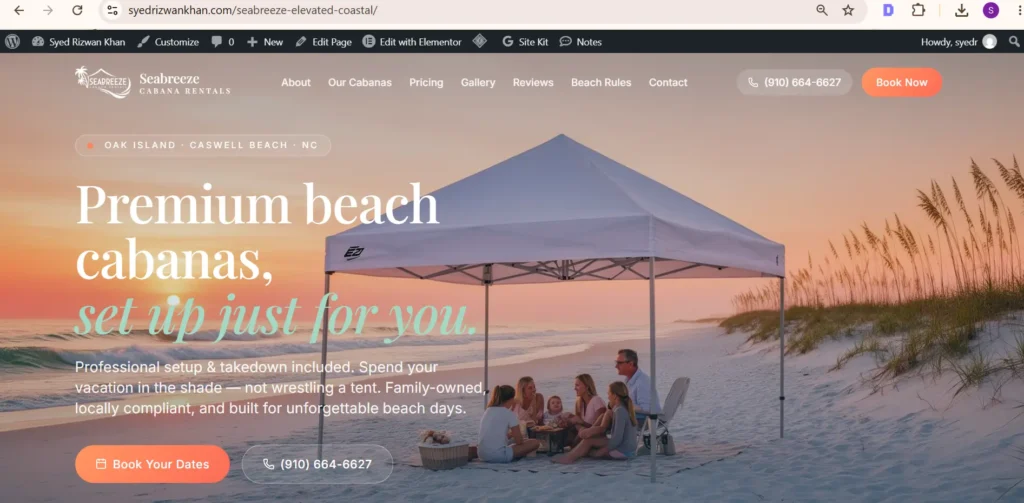
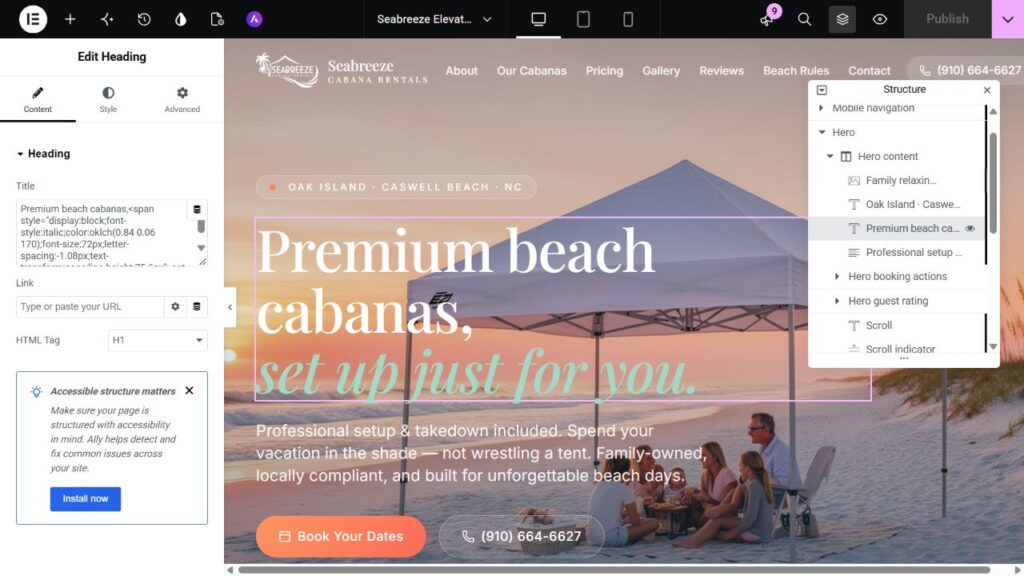
Seabreeze is a genuine public Lovable/React-to-Elementor demonstration, with a source link, WordPress build and actual Elementor editing proof. The screenshots below belong to that demonstration. It is an independent example, with no claim of commissioned client work, functioning bookings or measured commercial results.

Lovable migration questions

Can I keep the existing domain?

Usually, with a plan for hosting, DNS, email and redirects before any setting changes.

Do users and databases move automatically?

No. Account continuity, data migration and permissions need a separate plan.

Can you work from another generated frontend?

The same review principles apply. Feasibility depends on the actual design, source and functionality.

Should I use a converter or a manual rebuild?

A conversion tool may suit a straightforward design if its output meets your editing and functional needs. A scoped native rebuild is useful when you need deliberate widget structure, responsive decisions, interaction testing and a documented handover. Review a representative page in the editor before choosing; neither a tool export nor a visual match proves the backend works.
Plan the conversion

Compare React-to-Elementor development and the migration checklist. Send the source and required features through the inquiry section.

Have a design you need built?

Send your published Lovable link, the pages to keep, and a list of forms, accounts, payments or data connections. I will separate the website rebuild from application work, then confirm the package, quotation and schedule. A screenshot alone cannot establish backend functionality.

Seabreeze WordPress Elementor recreation with the matching beach cabana hero and booking buttons
Seabreeze frontend reconstruction demonstration — a React/Lovable interface rebuilt in WordPress; shown as a demonstration, not a commissioned Figma project.
Seabreeze homepage open in Elementor, showing the editable hero H1 and classic section, column and widget hierarchy.
Genuine Elementor editor capture: the Seabreeze hero H1 is a native Heading widget in classic sections and columns. Visual matching and CMS editability are checked separately.
Scroll to Top